Recent Posts

Monday, July 6, 2015

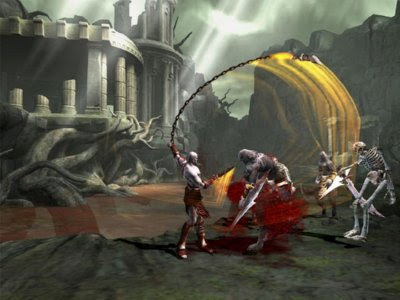
God Of War 2

                                                                       God of War 2 (190 MB )

Cover


System Requirements

 
OS- Windows XP/7/8/8.1/Vista
   
CPU- Dual Core or Better
 
RAM- 2 GB
 
HDD- 3 GB free

Graphic card- 256 MB

Sound Card- DirectX Compatible

DirectX 9 or updated

Keyboard & Mouse or Joystick


Screenshots

   
Screenshots

Screenshots


Password : apunkagames


How to Install 

1)  Extract the file using Winrar. 
                                                                         
                                               2) Open "God of War 2 - Apun Ka Games" folder, double click on "Setup" and install it.
                 
                                               3) After installation complete, go to the folder where you install the game.
            
                                              4) Open folder, double click on "God of War II" icon to play the game. Done!


Share:

God Of War 1

                                                                       God of War 1  (195 MB)

Cover


System Requirements
 
OS-Windows XP/7/8/8.1/Vista

CPU- Dual Core

RAM- 1 GB RAM
 
HDD - 3 GB free
 
Video Card- 256 MB Any
 
Sound Card- DirectX Compatible
 
DirectX- 9.0c or Updated
                                                             
                                                                     Screenshots

Screenshots

Screenshots
                                            

How to Install

1)  Extract the file using Winrar. 
2)  Open "God of War 1 - Apun Ka Games" folder, double click on "Setup" and install it.
3)  After installation complete, go to the folder where you install the game.
4)  Open folder, double click on "God Of War" icon to play the game. Done

                                                    
                                                                         Download HERE   

Password : apunkagames
Share:

Sunday, July 5, 2015

Asus ZenFone 2 Review

আসসালামুয়ালাকুম সবাই কে স্বাগতম জানয়ে শুরু করছি আজকের টিউন ।

আজকে আমি আপনাদের জানাবো Asus ZenFone 2 সম্পর্কে । নিচে configuration দেয়া হল ঃ

Network - 2G + 3G + 4G (Dual Sim supported)

3.5mm Jack - Yes

Alert types - Vibration, MP3, WAV ringtones

Battery Type - Non-removable Li-Po 3000 mAh battery

Bluetooth - v4.0

Camera Features - Autofocus, dual-LED (dual tone) flash, geo-tagging, touch focus, face detection,
panorama Camera Pixel - 4128 x 3096 pixels

Camera Resolution - 13 Megapixel

Chipset - Intel Atom

Colors Available - Osmium Black, Sheer Gold, Glacier Gray, Glamor Red, Ceramic White

Data Speed - HSPA 42.2/5.76 Mbps, LTE Cat4 150/50 Mbps

Dimensions - 152.5 x 77.2 x 10.9 mm (6.00 x 3.04 x 0.43 inches)

Display Resolution - 1080 x 1920 pixels (~403 ppi pixel density)

Display Size - 5.5 inches (~70.1% screen-to-body ratio)

Display Type - IPS capacitive touchscreen, 16M colors, Corning Gorilla Glass 3

Front Camera - 5 Megapixel

GPRS - Yes

GPS Function -Yes, with A-GPS, GLONASS

GPU -PowerVR G6430

Internal Memory - 16/32/64 GB

Loudspeaker - Yes

Memory Card - Supported  64 GB

Messaging- SMS (threaded view), MMS, Email, Push Email, IM

Multitouch -Yes

Operating System -  Android OS, v5.0 (Lollipop)

Processor - Quad core, 2.3 GHz

Radio - FM radio

RAM - 4 GB


Sensors -  Accelerometer, gyro, proximity, compass

USB - MicroUSB v2.0 (MHL TV-out), USB Host / OTG

Video - 1080p@30fps

এর দাম রাখা হয়েছে বাংলাদেশি টাকায় ২৮০০০ TK.


Asus zenfone 2

Asus zenfone 2

Asus zenfone 2


Share:

Saturday, July 4, 2015

Blutooth এর সাহায্যে mobile দিয়ে pc তে net চালান খুব সহজেই

আসসালামু আলাইকুম,
আজকে আমি আপনাদের দেখাবো কিভাবে Blutooth এর মাধ্যমে PC তে Mobile দিয়ে Net চালান যায়।
প্রথমে আপনার Laptop এর Blutooth অন করুন, তারপর PC থেকে যে Mobile এ Connect করবেন সেটি Add করুন। এরপর আপনার Pc  এর Blutooth  Icon এ Right Click করে show bluetooth devices  এ যান,  আপনার কাঙ্কিত  Device টার উপর Right Click করেন। connect using> access point এ Click করুন। Dial-up-networking এ আপনার operator  নাম টি দেখিয়ে দিন।  আপনার  কাজ শেষ ।
এখন  ইচ্ছে মত Net চালান ।
Share:

PC র জন্য Alarm Clock 3.1.0 লাইফটাইম লাইসেন্স সহ

আজকে  আমি  আপনাদের জন্য নিয়ে এসেছি Lifetime Lience সহ Alarm Clock 3.1.0  .
তাই কথা বেশি না বলে  নিচে download link দিলাম।

Download Here

Alarm Clock-3.1.0


আশা করি Software টা সবার কাজে লাগবে। 
Share:

Thursday, July 2, 2015

GP তে ২৫টি সাইট visit করুন একদম Free

আসসালামুয়ালাইকুম,
আজকে আমি আপনাদের জানাব কিভাবে gp তে ফ্রী website চালান যায়। GP তে নিজস্ব gpএর official opera mini দিয়ে free 25 টি site browser করা যাবে।
এখান থেকে download করুনঃ- Download here
আপনি নিম্নোক্ত siteগুলো visit  করতে পারবেন-

১)  bdnews24.com
২)Ekhanei.com
৩) gpworld.com
 ৪ ) gpcic.org
৫ ) gamezilla.com.bd
৬ ) http: //­wap.gpworld.com/
৭ ) 202.164.208.61/sj
৮ ) 202.164.208.61/sj2
৯ ) mb.gr ameenphone.com/­mobilebackup/
wap/
১০) mb.gr ameenphone.com/­grameensync/
s/
১১ ) wt.gr ameenphone.com
১২) wt1.gr ameenphone.com
১৩) 202.56.4.225/gpwap/
১৪) m.gr ameenphone.com
১৫) m.g pgamestore.com
১৬) http://­wap.gpworld.com
১৭) bd.dooplays.com
১৮) bd.wappey.com
১৯) bn.zero.wikipedia.or­g
২০) bits.wikimedia.org
২১) zero.wikipedia.org
২২) upload.wikimedia.org­/wikipedia/
commons/8/84/
w_logo_for_mobile_fr­ontend.gif
২৩) lm.facebook.com
২৪)internet.grameenphon­ e.com
২৫) http://­wap.gpworld.com
Share:

Wednesday, July 1, 2015

Pen Drive Format দেয়ার উপায়

কিছু ভাইরাসের কারনে পেনড্রাইভ বা মেমোরি কার্ড ফরমেট হয় না । আজ আমি আপনাদের দেখাবো কিভাবে pen drive format করা যায়।
 তাহলে শুরু করা যাকঃ

১। প্রথমে কম্পিউটার চালু করে Pen drive বা memory card কম্পিউটারে connect করে start+run এ গিয়ে সেখানে

২। dos mode command prompt চালু করুন।

৩। এখানে disk part লিখে enter চাপুন।

৪। list disk লিখে enter চাপুন ।

৫। এখন একটা List এ  Pen drive সহ যে Memory  drive গুলো কম্পিউটারে connect করা আছে সেগুলো
দেখাবে ।

৬।  select disk 1 লিখে Enter চাপুন  (computer এ  শুধু hard disk ও pen drive  লাগানো থাকলে disk 1 এ pen drive থাকে।)

(আরো drive লাগানো থাকলে disk 2 বা disk 3 হতে পারে। তখন select disk 2 বা select disk 3 লিখে Enter চাপতে হবে)৭। clean লিখে এন্টার চাপতে হবে।

৮।  creat partition primary লিখে Enter চাপুন। ।

৯। exit লিখে Enter চাপুন ।

এখন দেখুন আপনার pen drive এর সম্পূর্ণ Space ব‍্যবহারের উপযোগী। যে Pen drive  বা Memory Format  হত না এখন তা  আগের মত Format দিন। অবশ‍্যই Format নিবে।
Share:

Blogger templates

Sample Text